
03 · NEX
NEX quotas and privacy: usage, data and consent
ProNEX usage limits by plan: Pro has a monthly allowance, Ultimate is unlimited (fair use), Essential has none. Plus what NEX reads and your privacy switches.
NEX usage limits depend on your Limbix plan: Pro includes 50 NEX interactions a month, Ultimate is unlimited (fair use), and Essential has no NEX. This page explains what counts as an interaction, what NEX reads from your journal, what leaves Limbix to reach the AI model, and the privacy switches you control.
How NEX usage limits work#
NEX by plan#
| Essential | Pro | Ultimate | |
|---|---|---|---|
| NEX Journal, actions and prompts | Not included | 50 interactions a month | Unlimited (fair use) |
| Check-ins | Not included | Included, from the same allowance | Included |
| Behavioral Profile | Not included | New profile monthly | New profile weekly |
| Sentiment Analysis | Not included | Included, not counted | Included, not counted |
Prices are not public yet.
What counts as an interaction#
One interaction is one request that NEX runs for you.
| Counts | Doesn't count |
|---|---|
| A chat message NEX answers | A greeting, "thanks", or a correction such as "you repeated yourself" |
A capability chip or slash read (/mistakes, /audit, /brief) | An instant decline of a market or trade-call question |
| The explain popover beside a dashboard figure | A proposal NEX declines (nothing to act on) |
| An action proposal | Pressing Apply on a proposal |
| A pre-trade call or a post-trade grade (Run it again · 1 AI call) | Save draft on a check-in |
| Writing guided-review questions, regenerating them, compiling the draft | Direct Note (No tokens) |
| Compiling a chat into a notebook draft | Sentiment reads of your notebook |
| Generate profile or Refresh profile | A request that fails before you get an answer |
| An AI recap in Reports |
When you pass the included amount#
On Pro, NEX doesn't stop at the included amount. In the app's words: "Going over never blocks you — NEX switches to a lighter model past your included amount." The NEX usage control changes colour as you near and pass it.
Ultimate is unlimited (fair use). Separately, every plan has a server-side safety ceiling set far above normal use, which stops runaway automated volume. Past it, NEX requests are refused until the count resets, with the message "NEX features disabled until next billing cycle."
The count resets on the 1st of each month (UTC). The usage popover shows the exact reset date.
Where to see your usage#
- NEX usage in the NEX Journal header or the chat's Live context panel: used against included, your plan, and the reset date.
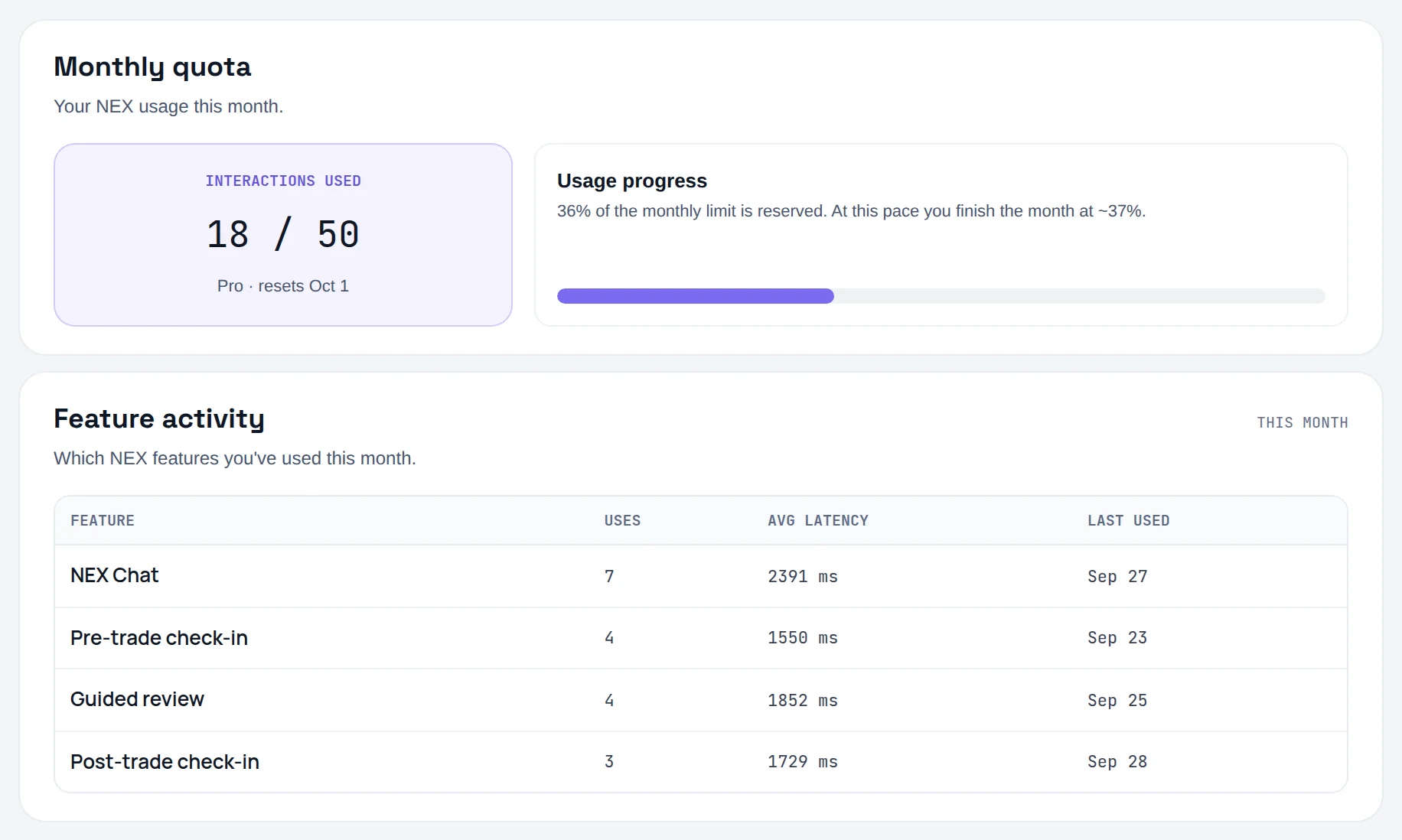
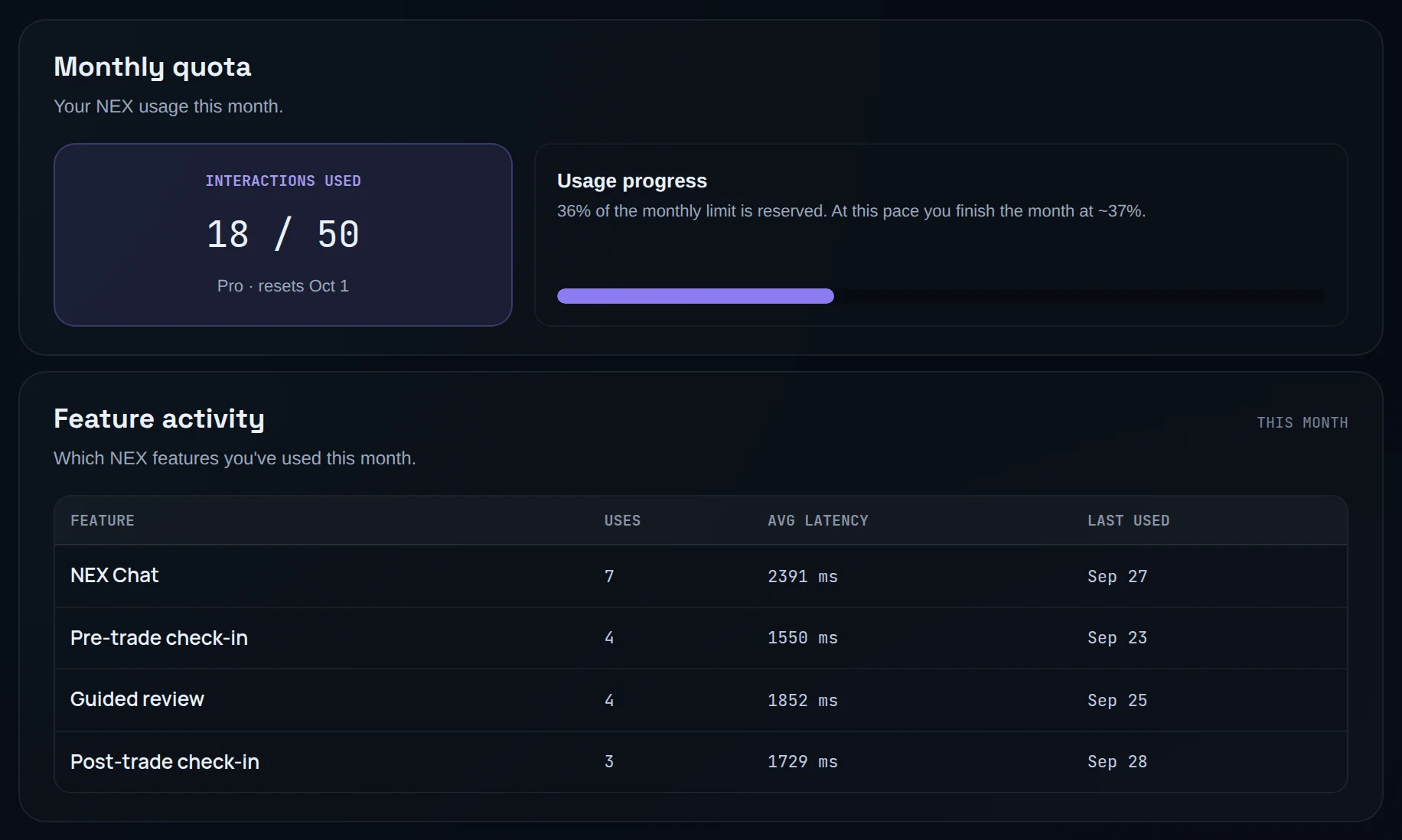
- Settings › NEX › NEX usage & quota: Monthly quota with Interactions used, and Feature activity, a table of each NEX Feature with Uses, Avg latency and Last used.
What NEX reads#
NEX reads your own Limbix data, and only what the question needs.
| Source | Read by | What |
|---|---|---|
| Trades | Every surface | Symbol, side, times, P&L, playbook, rule breaks, mistakes, emotion, grade, tags, account scope |
| Playbooks | Chat (when attached), audits, reviews | Rules, entry and exit criteria, recorded adherence |
| Check-ins | Chat, check-ins, profile | Your answers, grades and commitments |
| Notebook entries | Sentiment Analysis | The text of published entries and their linked trades |
| Sentiment and risk flags | Chat, check-ins, profile | Tone scores and flags from your entries |
| Behavioral Profile | Chat, check-ins | Your latest profile's archetype and weaknesses |
| Coach memory | Chat | Commitments, whether you kept them, patterns already raised, topics you declined |
| Risk limits and prop rules | Check-ins, prop reads | Your limits, stand-down line, and the firm rules stored in Prop Hub |
What leaves Limbix#
The seven capability reads (ask, audit, mistakes, brief, prop, review, explain) are computed inside Limbix. Writing a chat reply, a check-in explanation, a profile or a sentiment read needs an AI model, so Limbix sends a text summary of the relevant records to a third-party AI model provider. Before it goes:
- internal IDs for you, your trades, entries and conversations are replaced with
[redacted-id]; - payment method, discount code and purchase price values are redacted;
- anything you wrote is wrapped and labelled as your data, so the model is told never to follow instructions inside it.
The numbers in the summary are computed by Limbix. The model is told to copy them, never to calculate its own.
Consent and privacy settings#
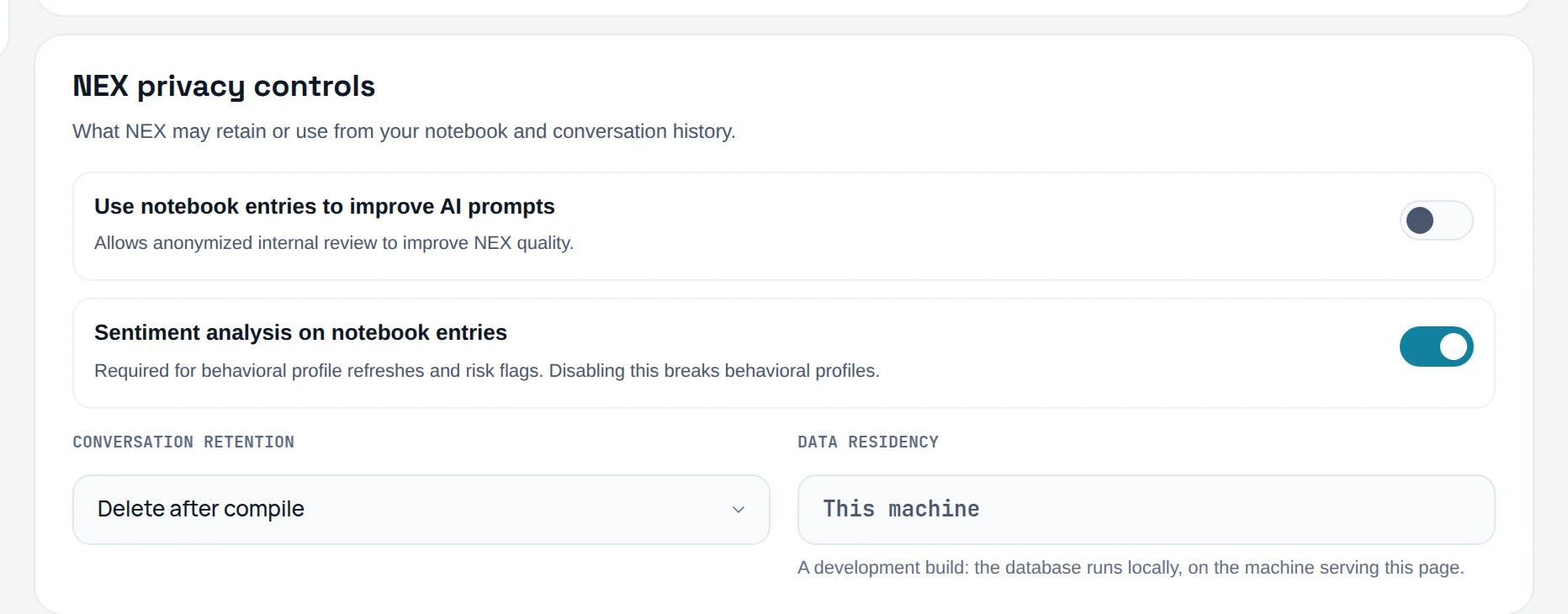
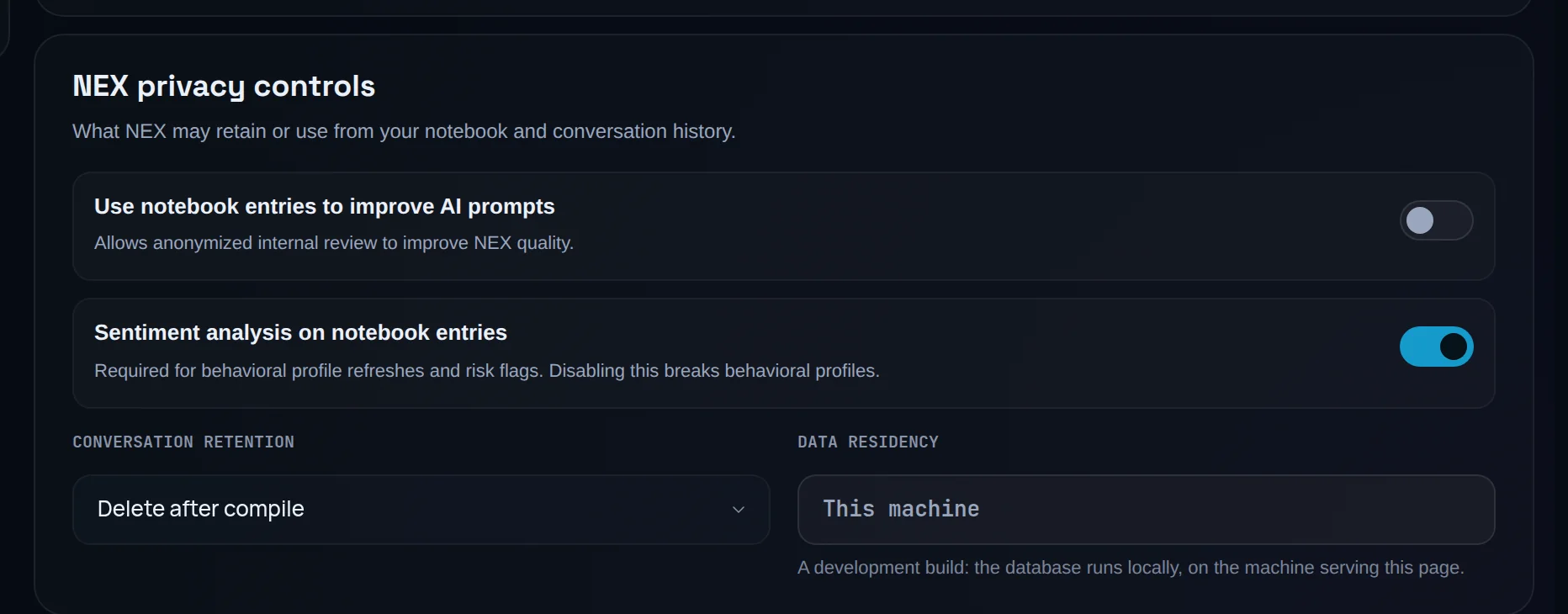
Open Settings › Data & privacy › NEX privacy controls.
| Setting | Default | What it does |
|---|---|---|
| Use notebook entries to improve AI prompts | Off | "Allows anonymized internal review to improve NEX quality." Your choice is saved, but no Limbix feature uses it yet, on or off. |
| Sentiment analysis on notebook entries | On | Lets NEX read the tone of your published entries. Switching it off takes effect immediately: no new reads, and your sentiment results stop being served. See Sentiment Analysis. |
| Conversation retention | Delete after compile | Your choice for how long NEX Journal transcripts are kept: Delete after compile, Keep for 90 days or Keep forever. Limbix saves the choice but doesn't act on it yet: transcripts stay until you delete them with Delete conversation. |
| Data residency | Read only | Where this deployment's database is hosted, as the deployment declares it. It shows Not published when the configuration doesn't say. |
You can also remove data directly:
- Delete conversation in the NEX Journal chat menu removes a thread. The transcript cannot be recovered.
- Settings › Data & privacy › Export & import includes Journal & check-ins: "Every entry with its NEX read, plus the check-ins from those days."
- The rest of your data controls are in the Settings guide.
What NEX won't do#
- Reach your broker. Limbix has read-only access to trade history and cannot place, modify or cancel an order.
- Read another trader's journal. Every read is scoped to your account.
- Follow instructions hidden in your text. Journal entries and messages are passed to the model as data.
- Keep reading your notebook's tone after you switch sentiment off. No new sentiment read is made from then on. Reads made before stay stored, and NEX features such as the Behavioral Profile still read your entries.
Prompts to try#
Every prompt uses one interaction on Pro. These three are good value because each answers several questions at once.
How is this month going?
Draft my weekly review
What are my costliest mistakes over the last 30 days?
Actions and confirmations#
A proposal uses one interaction; applying it is free. A proposal NEX declines is refunded. See Actions and confirmations.
Limits#
- The monthly count resets on the 1st (UTC).
- Sentiment reads are not counted, but a daily analysis limit applies.
- Limbix can switch NEX features off platform-wide, for example during an incident.
Frequently asked questions#
How many NEX messages do I get on Pro?#
Pro includes 50 NEX interactions a month, counted from the 1st (UTC). An interaction is one request NEX runs: a chat answer, a capability read, a check-in, a profile refresh or an action proposal. Greetings, instant declines, failed requests and Apply don't count. Past the included amount, NEX switches to a lighter model and keeps answering.
Is NEX unlimited on Ultimate?#
Ultimate includes unlimited NEX interactions under fair use. You don't have a monthly allowance to watch, and the usage control shows "Unlimited (fair use)". Like every plan, Ultimate sits under a server-side safety ceiling far above normal use, which exists to stop runaway automated volume rather than to limit a trader.
Is my trading journal sent to an AI provider?#
Only what a request needs. The capability reads are computed inside Limbix. For a written reply, a check-in, a profile or a sentiment read, Limbix sends a text summary of the relevant records to a third-party AI model provider, with internal IDs and payment details redacted and your own text labelled as data. The numbers in it are computed by Limbix, not the model.
Can I stop NEX from reading my notebook?#
Yes. Switch off Sentiment analysis on notebook entries in Settings › Data & privacy › NEX privacy controls. It takes effect immediately: new entries are not read and your sentiment results stop being shown. The Behavioral Profile and risk flags lose the journal-tone evidence.
What happens to my NEX conversations?#
Each conversation is stored so you can reopen it from the history rail. You can delete any thread with Delete conversation, and the transcript can't be recovered. Conversation retention in Settings records how long you want transcripts kept. Compiling a chat opens a notebook draft; it becomes an entry only when you save it.