
03 · NEX
Pre-trade and post-trade check-ins with NEX
ProA pre-trade check-in gives you a readiness call; the post-trade check-in grades your session A to F on discipline and execution, never on P&L. Here's how.
A pre-trade check-in in Limbix is a short readiness read before you trade: you rate your state, name what is pulling at your attention and write your plan, and NEX gives a green, yellow or red call. After the close, the post-trade check-in grades your session from A to F on discipline and execution, never on P&L.
How the pre-trade check-in and post-trade grade work#
Open Check-ins in the sidebar. The page has three tabs: Pre-trade, Post-trade and History.
The pre-trade check-in#
Four questions, each on the screen as written:
- Q1 · Internal state — "How are you showing up right now?" on a 1 to 5 scale.
- Q2 · External pressure — "What's pulling attention away from the plan?" Pick any of Poor sleep quality, Personal issues, Financial pressure, Market anxiety, Distraction / context switching, or None of the above.
- Q3 · Carry-forward — yesterday's commitment, shown back to you, with an optional note on whether it still fits.
- Q4 · Session plan — Focus playbooks, Avoid today, Max trades, Max loss limit and your written plan. Required on your first check-in, optional after.
Press Ask NEX for the call. The colour is set by fixed rules in Limbix, not by the model. The model writes the explanation around it.
| Call | Headline | What sets it |
|---|---|---|
| Red | "Today is a sit-out." | You reached your own stand-down line, a low composure rating, several stressors at once, recent tilt or despair flags in your journal, a plan to make back yesterday's loss, or a prop account at high breach risk |
| Yellow | "Trade with caution." | A middling composure rating, one active stressor, or 30-day rule compliance below target |
| Green | "Clear to trade your plan." | None of the above |
When the reason is your stand-down line, the verdict says so in your terms: "You reached the stand-down line you set for yourself today." That line is your decision, quoted back to you. It is not NEX's read of you.
Under NEX suggests, the call tightens the limits you wrote in Q4. Green keeps them. Yellow trims both. Red suggests a single trade and a much smaller loss limit. With no limit set, nothing is suggested, because NEX never invents a number for you. Guardrails for today and If you trade anyway list the specifics. The inputs behind the call shows what you entered.
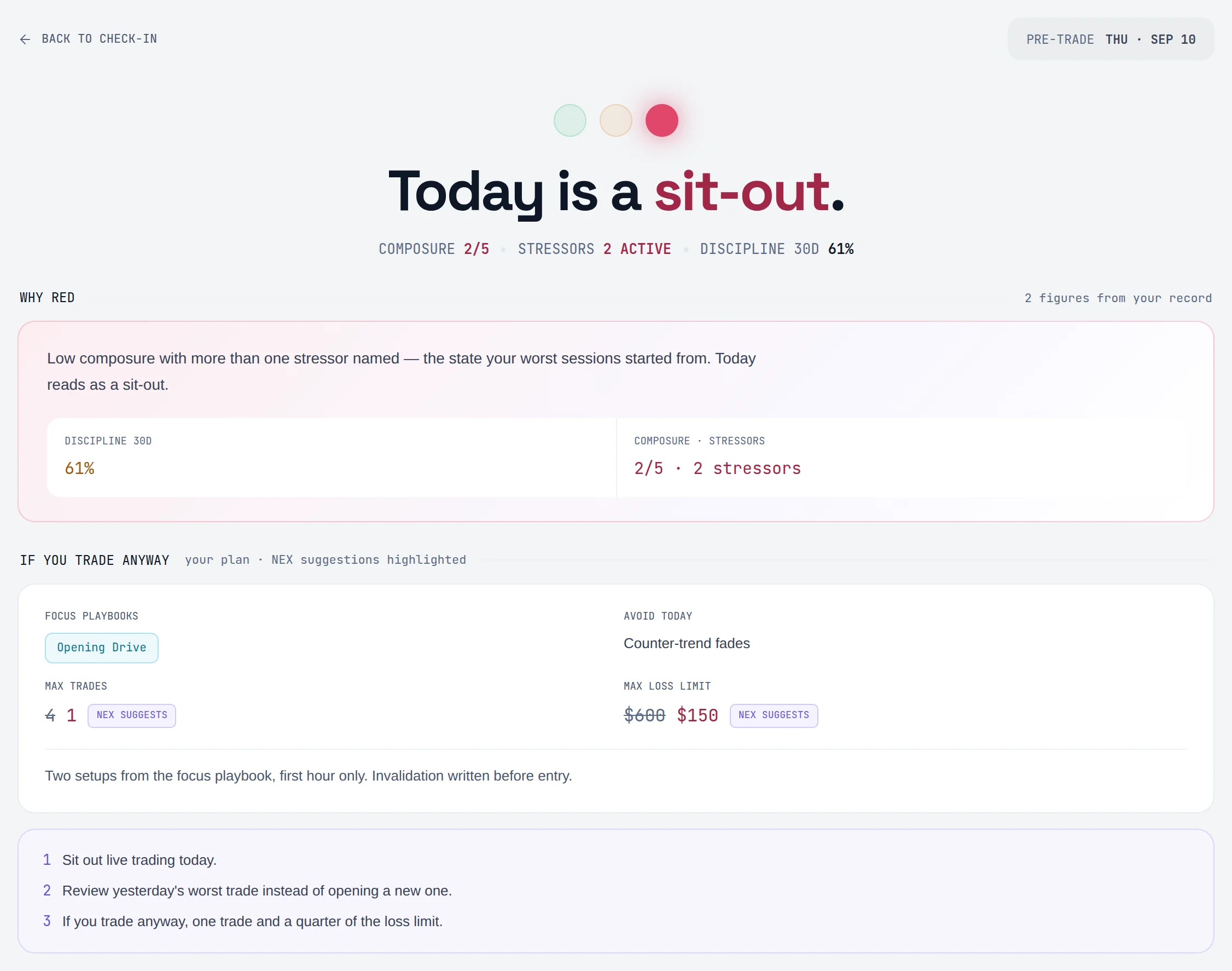
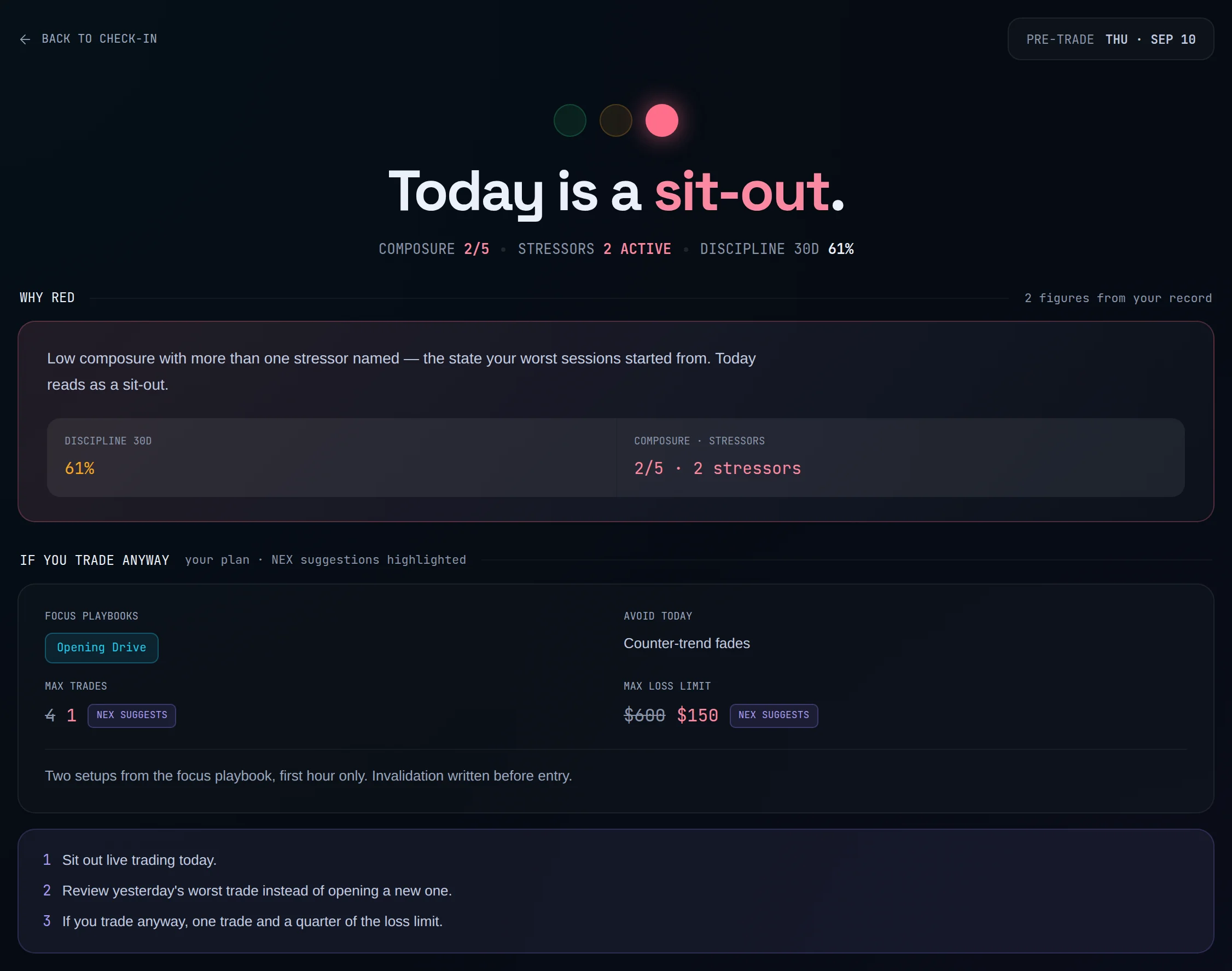
A red call is not a block. Nothing in Limbix stops you logging or taking a trade.
The post-trade check-in#
The screen opens with the session's trades and any rule breaks. Then three questions:
- Q1 · Discipline + self-grade — "How disciplined was this session?" on a 1 to 5 scale, and a Self-grade from A to F, or Skip.
- Q2 · Review the worst trade — what happened around it, tied to the rule it broke when there is one.
- Q3 · Tomorrow's commitment — Commitment · required, one testable rule for the next session, and Setup change · optional.
Tick Also save the review to my notebook if you want a notebook entry too. Then press Ask NEX to grade the session.
How the session grade works#
The grade is about discipline and execution. It starts from your rule compliance over the last 30 days and drops further when your own review describes overtrading, chasing, revenge, an oversized trade, a late entry or ignoring the plan.
One rule protects you from a good-looking day. A session that made money but broke rules or included impulsive trades is capped at C. A green day built on broken rules is still a bad day.
| Grade | Headline |
|---|---|
| A | "Textbook execution." |
| B | "A good day, with a leak." |
| C | "Discipline capped it." |
| D | "The plan slipped." |
| F | "The plan didn't hold." |
The grade can carry a plus or minus, such as A-. Below it, the stat line shows Plan adherence, Rule breaks, Rule-break cost, Plan-clean trades and Impulsive entries. If you gave a self-grade, the last item compares it with NEX's: "NEX agrees" when the letters match, or "NEX says B" when they don't.
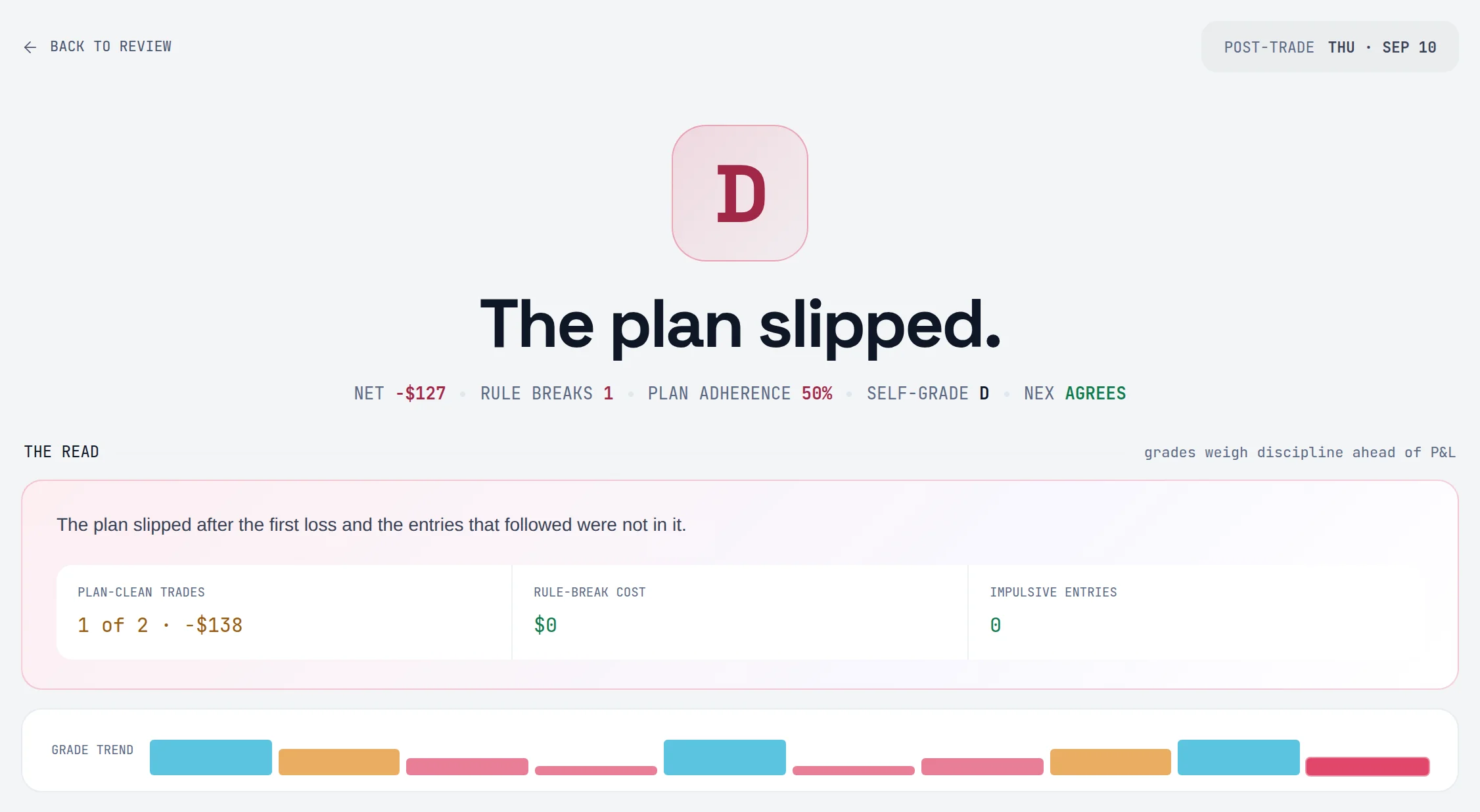
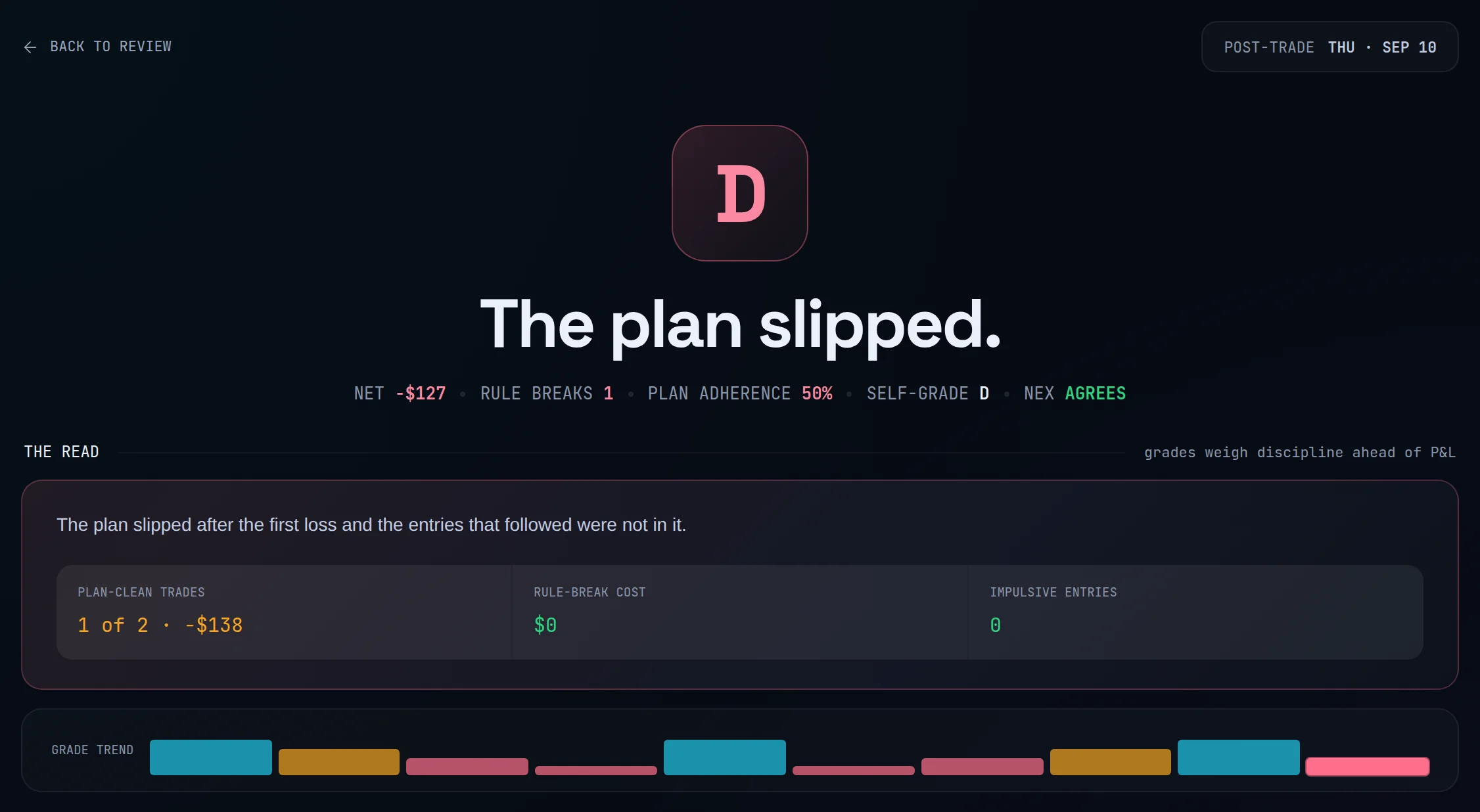
Session adherence#
Plan adherence is 1 − rule breaks ÷ trades, shown as a percentage and held between 0% and 100%. Five trades with one rule break is 1 − 1 ÷ 5 = 80%. The same figure appears as ADH on the post-trade rows in History, so the two never disagree about one day.
The windows NEX grades over#
Each check-in compares today with two windows, both in your profile timezone:
- Previous day: the trading day before this one.
- Week to date: Monday of this week to today. Weeks start Monday, the same as the dashboard calendar.
For each window NEX sees net P&L, trade count, rule breaks and impulsive trades, plus your 30-day Discipline Score across all accounts. When a window holds no trades, its discipline figure is marked unscoreable, never zero.
History#
History lists every call and review you have run, grouped by week, filterable by Check-in type and Date range. Load earlier weeks goes further back. The summary shows:
- your mix of green, yellow and red calls;
- follow-through: the share of your commitments you kept, counting only sessions that can be scored;
- red calls on days you traded anyway, and what the losses on those days added up to;
- your check-in streak, which a missing check-in today doesn't break until tomorrow.
The red-call count relies on realized P&L to tell whether you traded. A red day traded to exactly break-even counts as quiet.
What NEX reads#
- Your answers to this check-in, and yesterday's commitment.
- The previous day and week to date: P&L, trades, rule breaks, impulsive trades.
- Your 30-day Discipline Score and rule compliance, across all accounts.
- Recent trades, journal sentiment and risk flags.
- Your latest Behavioral Profile, labelled as possibly outdated when it is old.
- Your risk limits and stand-down line from Settings, resolved through the risk limit chain.
- For a prop account: the breach buffer, average loss over 30 days, distance to target and the firm's stored rules. Rules marked advisory are labelled as not live-monitored.
What NEX won't do#
- Give a trade call. If your plan asks for an entry, exit, stop, target or size, the check-in adds a line saying it can't give those calls, and that the read is readiness and risk-control guidance only.
- Grade on money. A red session that followed the plan can grade well. A green one that broke rules is capped at C.
- Set limits you didn't choose. Suggested limits are always a tighter version of your own numbers.
- Block anything. The call is a colour, not a gate.
Prompts to try#
What did I commit to in my last post-trade check-in?
How did my trades go yesterday?
Audit today's playbook adherence
Actions and confirmations#
Submitting a check-in saves it to your check-in history; that is the confirmation. Save draft keeps your answers on this device without calling NEX. If you already checked in today, you can keep today's record or press Run it again · 1 AI call.
In the NEX Journal you can also ask NEX to grade a session ("grade my June 25 session as C") or set tomorrow's focus. Both arrive as proposals you apply. See Actions and confirmations.
Limits#
- Each pre-trade call and each post-trade grade uses one NEX interaction. Save draft uses none.
- Reminders are set in Settings › NEX › Automation defaults: Pre-trade check-in, Post-trade check-in, Pre-trade reminder (minutes before Session start) and Post-trade delay.
- When NEX is offline, the check-in still returns a call built from fixed rules, and the page marks the run as offline.
Frequently asked questions#
What is a pre-trade check-in in trading?#
A pre-trade check-in is a short routine before the session: you rate your state, list what could pull you off the plan, and write the plan with its limits. In Limbix, NEX reads that against your recent discipline and returns a green, yellow or red call, plus a tighter version of your own limits when the call is not green. It is a readiness read on you, not a view on the market.
How does NEX grade my trading session?#
The post-trade grade runs from A to F and is based on discipline and execution, not profit. It starts from your recent rule compliance and drops when your own review describes behavior like chasing or overtrading. A profitable session that broke rules or included impulsive trades can't grade above C. Your own self-grade is compared with NEX's so you can see where you read the day differently.
Why is my pre-trade check-in red when I feel fine?#
The call follows fixed rules. Common causes are reaching the stand-down line you set, recent tilt or despair flags from your journal, a plan that mentions making back a loss, or a prop account close to its breach limit. Open The inputs behind the call to see which applied. A red call is advice to yourself, not a block: you can still trade and log it.
What is session adherence?#
Session adherence is the share of a session's trades that stayed inside your rules: 1 − rule breaks ÷ trades, from 0% to 100%. Four trades with one rule break is 75%. It appears as Plan adherence on the grade page and as ADH on post-trade rows in History. It is a quick per-day read; your Discipline Score is the fuller measure.
Does the check-in know my prop firm's rules?#
For a prop account, yes. The pre-trade check-in weighs your buffer to breach, your average loss over 30 days and your distance to target, and it names the firm, model and rule version it used. Rules the app can't monitor live are labelled as advisory. Everything comes from the rules stored in Prop Hub, so check those are current.