
03 · NEX
Sentiment Analysis: the tone of your trading journal
ProTrading journal sentiment analysis in Limbix: each entry scored −1 to +1, tilt, despair and overconfidence flagged, tone set beside linked P&L. You can opt out.
Trading journal sentiment analysis reads the emotional tone of what you write. In Limbix, NEX scores each notebook entry from −1 (despair, rage) to +1 (calm confidence), flags language tied to tilt, despair or overconfidence, and sets your tone beside the P&L of the trades linked to that entry. It describes your state, not the market.
How trading journal sentiment analysis works#
Publish a notebook entry and NEX reads it in the background. Editing the entry queues a fresh read. Drafts are not read, and entries under 50 characters are skipped, so write a few sentences.
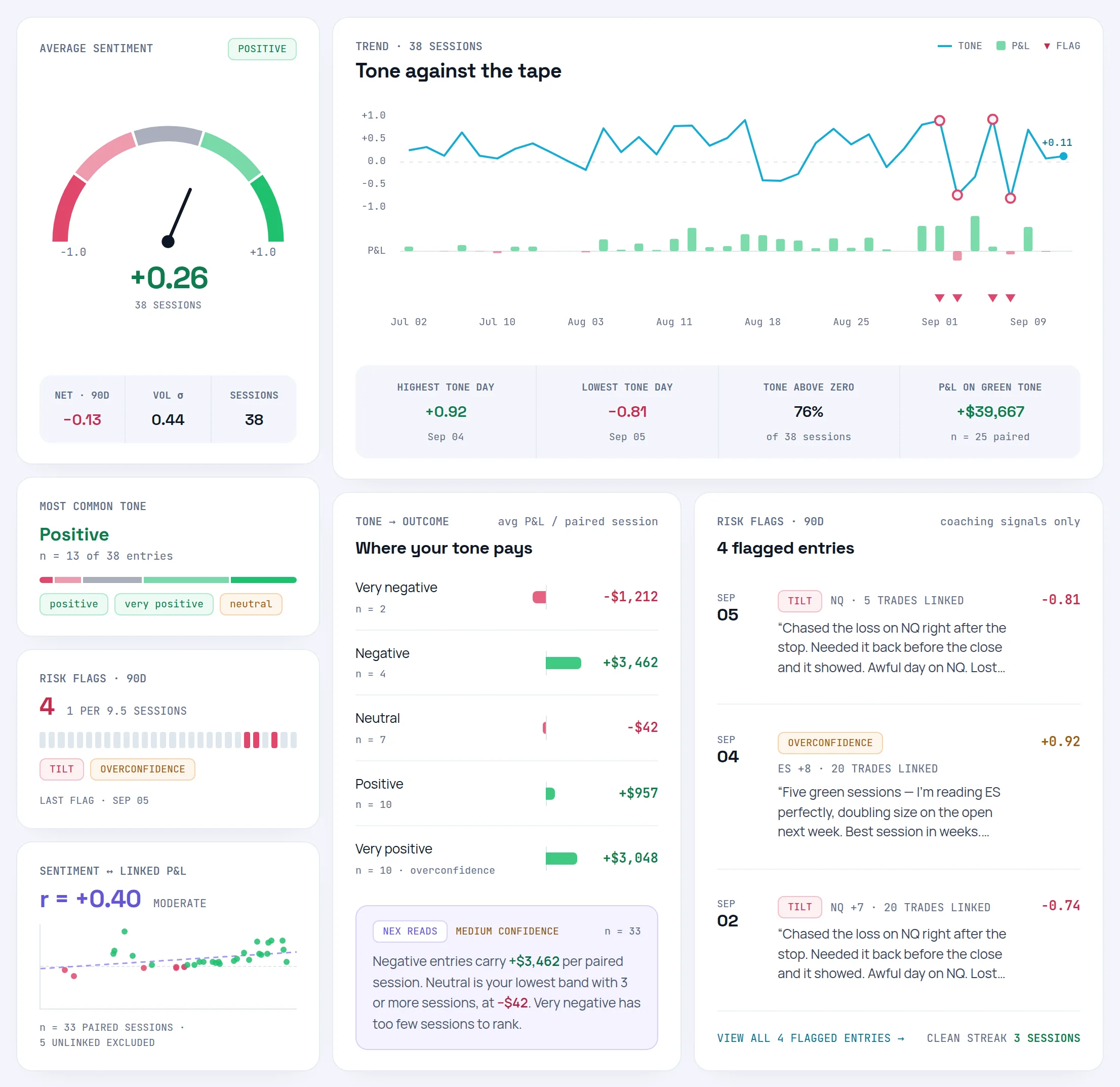
Open Sentiment Analysis in the sidebar to see the results. Switch the range with 7D, 30D, 90D, YTD or All. If older entries were never read, a button offers to analyze them now.
The sentiment score#
Every read produces one score from −1 to +1, placed in one of five bands. A score belongs to a band when it is at or above the band's minimum and below its maximum; the top band includes +1.
- Very negative −1 to −0.6
- Negative −0.6 to −0.2
- Neutral −0.2 to 0.2
- Positive 0.2 to 0.6
- Very positive 0.6 to 1
| Band | From | To |
|---|---|---|
| Very negative | −1 | −0.6 |
| Negative | −0.6 | −0.2 |
| Neutral | −0.2 | 0.2 |
| Positive | 0.2 | 0.6 |
| Very positive | 0.6 | 1 (inclusive) |
A losing session written up in plain, technical language should score near zero. NEX is told not to read a red day as negative sentiment unless the words carry it, and Limbix pulls clearly analytical entries toward neutral. The full definition is on Sentiment Score.
Each read also names the emotions it found, from a fixed list: focused, confident, calm, cautious, hesitant, anxious, stressed, fearful, frustrated, anger, euphoric, tilted, FOMO, reflection and fatigue. Words outside that list are dropped.
AI confidence#
Every read is stored with a confidence from 0 to 1, but the Sentiment page doesn't show it per entry. What you see is a High, Medium or Low word on the outcome read, set by how many entries it rests on.
How much evidence a read rests on, shown as High, Medium or Low. Short or vague entries, or few trades, give Low. Treat Low as a hint, not a finding.Entries Limbix treats as purely analytical have their stored confidence capped as well. Settings › NEX › Analysis display has a Show AI confidence badges switch, but it doesn't change the Sentiment page today. More on AI Confidence.
Risk flags#
Three flags, and only when the language genuinely supports them. The page calls them coaching signals only.
| Flag | What the language looks like | Weight |
|---|---|---|
| Tilt | "Chasing a loss back, revenge language after a stop." | Warning |
| Overconfidence | "Euphoric certainty, sizing up on a streak." | Caution |
| Despair | "Hopeless framing, giving up on the process." | Critical, shown more prominently |
A flag is an early warning, not a failure. When a flag appears in the last week, NEX is told to lead with the person in the NEX Journal, not to announce the flag. A recent tilt or despair flag also turns the next pre-trade check-in red. See Risk Flags.
Sentiment ↔ linked P&L#
This card sets the tone of each entry against the P&L of the trades linked to it, as a Pearson correlation: a number from −1 to +1 for how closely two series move together. It is an association, not a forecast. Link trades to your entries in the Notebook or this card has nothing to pair.
Below 12 paired sessions the card says "not enough data for a reliable read" instead of printing a strength. From 12 on, you see strong, moderate or weak, positive or negative, or "no linear relationship" when the number is close to zero.
Where your tone pays shows your average linked P&L per paired session in each tone band. An entry with no linked trades adds nothing, rather than a zero that drags the average toward break-even. More on Sentiment ↔ Linked P&L.
What NEX reads#
- The text of each published notebook entry, with IDs removed, wrapped as your data so nothing in it is treated as an instruction.
- The entry's date, the trades linked to it with their P&L and emotion tags, and the prop account they belong to, if any.
Nothing else. Sentiment reads your writing; it does not read price data or the market.
What NEX won't do#
- Forecast anything from your mood. The linked-P&L card measures how two series moved together in the past. It says nothing about your next trade.
- Diagnose you. Flags describe language in an entry. They are not a judgement of you.
- Read what you haven't published. Drafts are skipped.
- Keep reading after you switch it off. See below.
Consent: switching sentiment off#
Sentiment analysis is on by default. Turn it off with Sentiment analysis on notebook entries in Settings › Data & privacy › NEX privacy controls. The change takes effect immediately:
- no new entry is analyzed, and queued reads are skipped when they run;
- the Sentiment Analysis page shows "Sentiment analysis is off" instead of your reads;
- the data endpoints behind it stop serving your sentiment results.
Switching off doesn't delete the reads you already have. They stay stored until you delete their entry or your account, and your Behavioral Profile keeps reading them. New risk flags stop, because no new reads are made. Turn it back on and new entries are read again, and the Sentiment page shows your stored reads again.
Prompts to try#
How is this month going?
What are my costliest mistakes over the last 30 days?
NEX already reads your recent sentiment and flags in every NEX Journal conversation, so you can ask about how a stretch of days felt alongside the numbers.
Actions and confirmations#
Sentiment writes nothing to your trades. The analysis is attached to the notebook entry it read. To act on a flag, ask NEX in the NEX Journal to add a watch item for your next pre-trade check-in; it proposes it and you apply it. See Actions and confirmations.
Limits#
- Sentiment reads don't count toward your monthly NEX interactions.
- A daily analysis limit protects the service. When it is reached, the remaining entries wait for the next run.
- One read covers one entry. An entry with no linked trades still gets a tone score but adds nothing to the linked-P&L card.
Frequently asked questions#
What is a sentiment score in a trading journal?#
A sentiment score is a number from −1 to +1 for the emotional tone of one journal entry. In Limbix, −1 is despair or rage, 0 is purely factual, and +1 is calm confidence. It is read from your words, not your P&L, so a losing day described calmly scores near zero. Scores fall into five bands, from very negative to very positive.
How does Limbix detect tilt in my journal?#
NEX reads each published entry and raises a tilt flag only when the language supports it: chasing a loss back, revenge language after a stop. It can also flag despair and overconfidence. A flag is a coaching cue, not a verdict. Recent tilt or despair flags turn your next pre-trade check-in red, and NEX takes them into account in conversation.
Does my journal tone tell me what my P&L will be?#
Limbix doesn't claim it does. The linked-P&L card shows how your tone and the P&L of linked trades moved together in the past, as a Pearson correlation. It needs 12 paired sessions before it names a strength, and even then it is an association, not a forecast. Use it to notice patterns in your own state, then test a process change.
Can I turn off sentiment analysis?#
Yes. Switch off Sentiment analysis on notebook entries in Settings › Data & privacy. It takes effect immediately: new entries are not read and the Sentiment Analysis page stops showing results. Settings warns that the Behavioral Profile and risk flags depend on sentiment, so those lose the journal-tone evidence. You can turn it back on at any time.
Why does my entry have no sentiment score?#
Four common reasons: the entry is still a draft, it is too short to read, sentiment analysis is switched off in Settings, or the read is still queued. Publish the entry, write a few full sentences, and check Sentiment analysis on notebook entries is on. Older entries that were never read can be analyzed from the button on the Sentiment Analysis page.