
04 · Metrics
Equity vs Target
ProEquity vs target is how much of the profit a prop account needs you have already earned: gain so far over gain required, 0% at breakeven, 100% at target.
Equity vs target is how much of a prop account's required profit you have already made. Limbix measures gain so far against gain required. An account that starts at €100,000, needs €110,000 and sits at €104,000 is 40% of the way there. It is not 95%, which is what balance divided by target would say.
How it's calculated#
- Current balance
- The account balance Limbix computes from your trades on it.
- Starting balance
- The balance the account opened with.
- Target balance
- Starting balance plus the account's profit target.
src/lib/prop-hub-progress.tsThe result is clamped between 0% and 100%. A balance under the start reads 0%, and anything past the target reads 100%.
The portfolio figure uses the same formula on sums. Limbix adds up the current, starting and target balances of your active accounts that have a target, then applies the formula once. An account with no target is left out of all three sums.
Try it#
Worked example#
One account. Start €100,000. Target €110,000. Current balance €104,000.
- Required gain: €110,000 − €100,000 = €10,000
- Gain so far: €104,000 − €100,000 = €4,000
- Equity vs target: €4,000 ÷ €10,000 = 40%
The portfolio. Add two more active accounts.
| Account | Start | Target | Current | Own progress |
|---|---|---|---|---|
| A · evaluation | €100,000 | €110,000 | €104,000 | 40% |
| B · evaluation | €50,000 | €53,000 | €49,400 | 0% (below start) |
| C · funded, no target | €25,000 | none | €26,500 | "—" |
- Accounts with a target: A and B. C is left out.
- Summed current: €153,400. Summed start: €150,000. Summed target: €163,000.
- Portfolio progress: (€153,400 − €150,000) ÷ (€163,000 − €150,000) = €3,400 ÷ €13,000 = 26.2%, shown as 26%.
Account B's €600 loss offsets part of A's gain. That is on purpose: the portfolio figure is the combined gain against the combined requirement.
If C were counted with its start as its target, its €1,500 gain would join the top line and add nothing below. The page would read 38% while the two accounts with a target had covered 26%.
When it shows "—"#
| Where | Shows | Why |
|---|---|---|
| Target column on the Prop Hub board | "—" | The account has no profit target. That is not 0% of a goal; it is no goal recorded. |
| Progress on the Equity tab | "—", No targets set | No active account has a target. |
| Progress on the Equity tab | Below start | Your targeted accounts are, together, under their starting balances. The cell shows how much there is to recover first. |
Funded accounts often have no profit target, and the wizard lets you leave it empty for a funded account. Evaluations need one.
What's a good equity vs target?#
The tooltip gives the scale: 0% at breakeven, 100% the moment a target is hit. There is no "good" band. Progress depends on how long the account has run and on the firm's time limit.
Two things to read with it:
- 100% is not a pass on its own. Limbix marks an evaluation passed when the target is reached and the Min trading days rule is met. You can sit at 100% and still need more trading days.
- 0% has two meanings. A new account and an account under water both read 0%. The row shows the gain against the required gain, and the Equity tab says Below start when you are under.
How to improve it#
Progress moves with your balance. The useful work is making sure the number is right and reading it with risk.
- Enter the target your firm uses. Set Profit target $ when you add the account. A wrong target gives a wrong percentage. See adding an account.
- Link every trade to the prop account. Progress is built from the trades on the account. A trade that isn't linked doesn't move it. See binding trades to an account.
- Read progress next to your buffer. 80% of the way with a 1.2× buffer-to-loss ratio is a very different day from 80% with 6×. The board puts Target and DD buffer side by side for this reason.
- Watch your pace, not just the distance. The Equity tab projects each account's ETA from its average day. Days to pass shows how long your past evaluations took.
Where you'll see it#
- Prop Hub board (
/prop): the Target column of the active accounts table. It shows the gain so far over the required gain, the percentage, and a bar. - Equity tab (
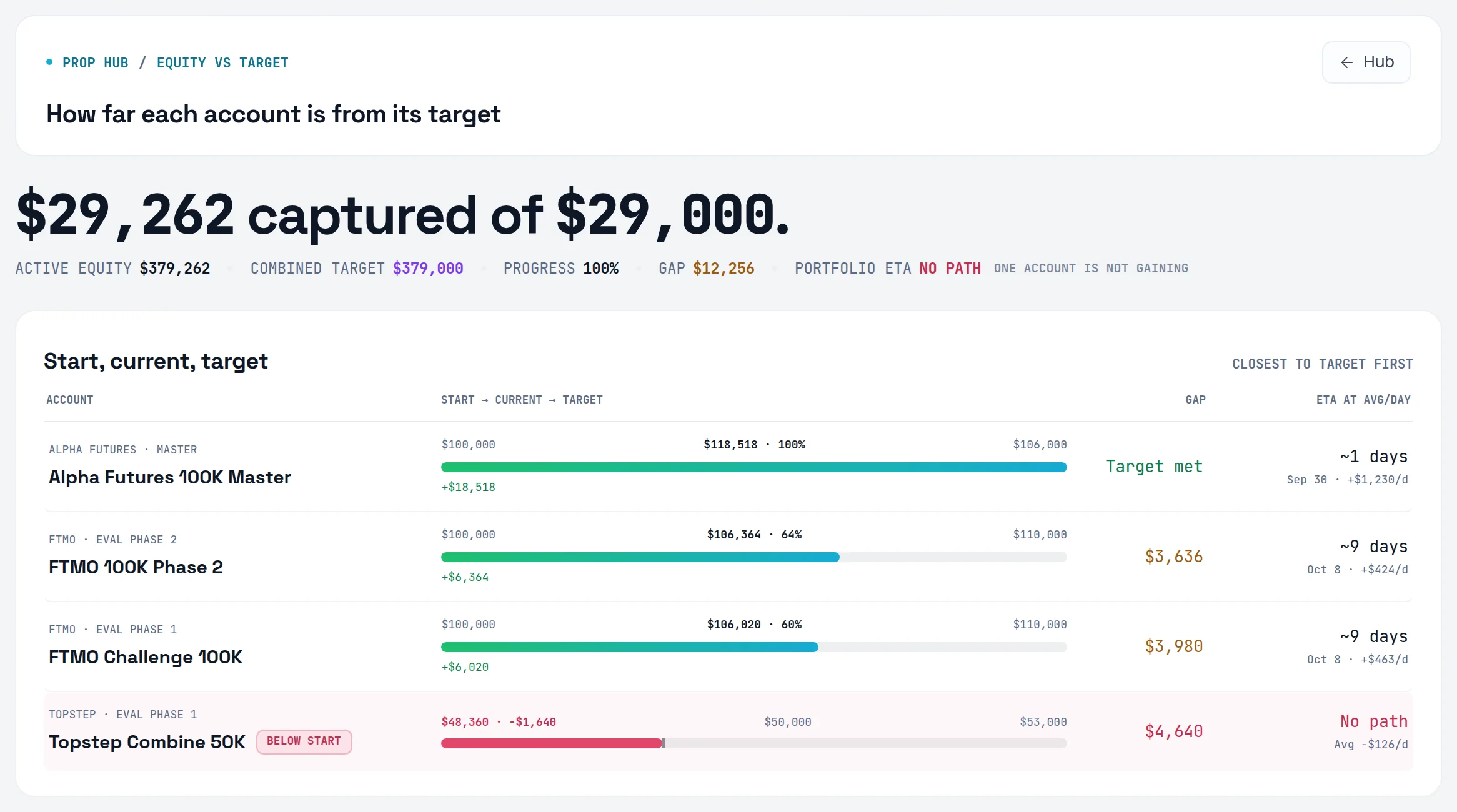
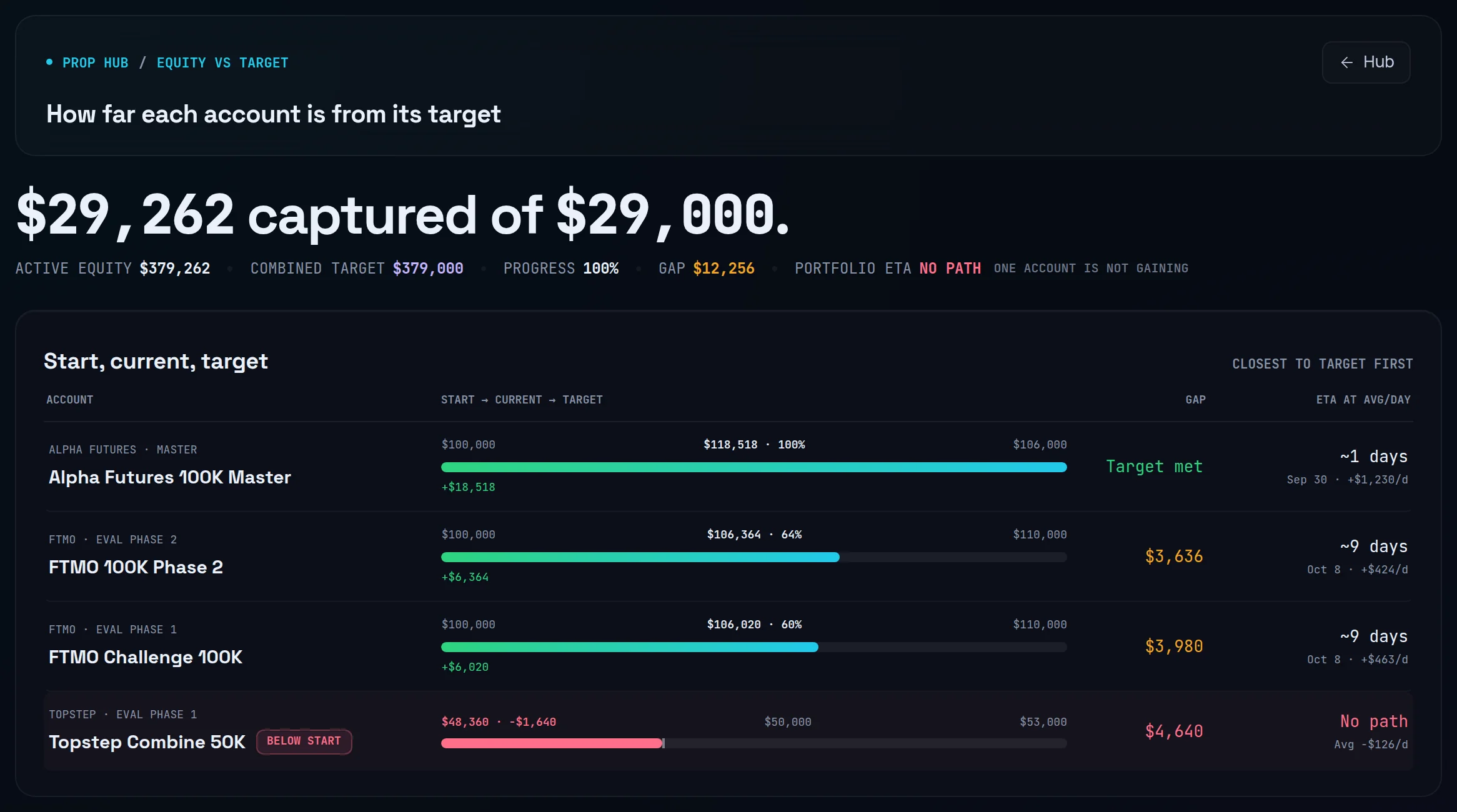
/prop/equity): headed "How far each account is from its target". The headline reads "€X captured of €Y". The cells show Active equity, Combined target, Progress, Gap and Portfolio ETA, then per-account rows and rollups by stage and firm. See the Prop Hub guide.
Frequently asked questions#
How do I calculate progress toward a prop firm profit target?#
Take your gain so far and divide it by the gain the target requires. Gain so far is current balance minus starting balance. Required gain is target balance minus starting balance. A €50,000 account with a €53,000 target at €51,500 is €1,500 ÷ €3,000 = 50%. Limbix does this for every account with a target, and clamps the result between 0% and 100%.
Why does Limbix show 0% when my account is down?#
Because progress is clamped at 0%. You can't be less than none of the way to a target. The account row still shows your gain against the required gain. When your targeted accounts are under water together, the Equity tab says Below start and shows the amount to recover. A new account and a losing one both read 0%, so check the gain beside it.
Why isn't my funded account included in the portfolio progress?#
Because it has no profit target. The portfolio figure sums current, starting and target balances over accounts that have a target. A funded account without one has no distance to cover, so its profit would inflate the top line without adding to the requirement. It still shows on the board, with "—" in the Target column.
I hit 100%. Why hasn't my evaluation passed?#
Limbix marks an evaluation passed when the balance reaches the target and the Min trading days rule is met. If you reached the target in fewer days than your firm requires, the account stays Active at 100% until you have traded enough days. On a two-phase evaluation, clearing phase 1 moves you to phase 2, where progress starts again against the new target.
Is equity vs target the same as percent of profit target on my firm's dashboard?#
It should match whenever your firm measures progress the same way: gain over required gain. If your firm shows balance over target, its number will look much higher early on. If Limbix and your firm disagree, check the starting balance and Profit target $ on the account, and that every trade is linked to it.