
04 · Metrics
Net Prop P&L
ProNet prop P&L is every paid payout you received minus every challenge fee, reset and add-on you paid. It shows whether prop trading has paid you so far.
Net prop P&L is the money prop trading has actually returned to you: every payout a firm has paid you, minus every challenge purchase, reset, add-on and fee you logged. Limbix counts cash that changed hands, not account balances. An evaluation sitting €3,000 up adds nothing until a firm pays you.
How it's calculated#
- Paid payouts (your share)
- Every payout with status Paid, at your share after the account's profit split. Requested and rejected payouts are left out.
- Purchase prices
- The purchase price you entered for each account when you added it.
- Logged costs
- Every reset, add-on, activation fee and other cost you logged against an account.
src/lib/prop-hub.tsIt runs across every prop account you have added to Limbix, whatever its state: active, passed, failed, breached, paid out or archived. A challenge you failed still cost you its fee, so it stays in.
Four rules decide what counts:
- Only paid money counts. A payout adds to the total when its status is Paid. A Requested payout appears as Pending beside the figure, never inside it. A Rejected payout is left out entirely.
- Your share, not the gross. When you log a payout, Limbix works out your amount from the account's Profit split %. That amount is what counts. The form shows it as You receive.
- Every cost you log. The Purchase price from the account wizard, plus each cost logged with Log cost: Reset, Add-on, Activation fee or Other.
- Balances are not an input. Trading P&L on a prop account never enters this figure. It moves your equity vs target and your breach buffer, not your net.
Worked example#
You run three prop accounts. Every amount below is one you logged.
| Account | Stage · status | Costs | Payouts |
|---|---|---|---|
| Eval 1 | Evaluation · Breached | €155 purchase + €99 reset = €254 | none |
| Eval 2 | Evaluation · Active | €155 purchase | none |
| Funded 1 | Funded · Active | €130 activation fee | €1,800 gross, Paid · €1,000 gross, Requested |
Funded 1 has a 90% profit split. So the paid payout is worth €1,620 to you, and the requested one €900.
- Spent: €254 + €155 + €130 = €539
- Received: €1,620 (the requested €900 is not in here)
- Net prop P&L: €1,620 − €539 = €1,081
- Pending: €900, shown in its own cell
Two things did not count. Eval 2 is €2,400 above its starting balance, and that money is not yours yet. The €900 request is not yours yet either. When the firm pays it and you mark it Paid, your net becomes €1,981.
Before the first payout was marked Paid, the same three accounts read −€539. Nothing about the trading changed. Only the cash did.
When it shows "—"#
- No active account matches your filters. The Net prop P&L cell on the Prop Hub board shows "—" when no active account is in view. That happens on a first run, when every account is closed, or when a filter matches nothing. The Net P&L tab still shows your all-time figure.
- Nothing logged yet. With no costs and no paid payouts, the Net P&L tab reads €0. That is a real zero: nothing in, nothing out.
- Essential plan. Prop Hub is part of Pro and Ultimate. On Essential the page shows an upgrade panel instead. See plans.
A requested payout never changes the figure, however large. It moves only when you mark it Paid.
Limbix doesn't convert currencies. If your prop accounts use more than one base currency, the hub adds their amounts as they are and labels the total in USD. Read each account's own figure instead.
Is my net prop P&L good?#
Limbix sets no bands for this number. It is a sum of your own money, and the only line that matters is zero.
| Net prop P&L | What it means |
|---|---|
| Above zero | Prop trading has paid you more than it has cost you so far. |
| Zero | You are exactly back to what you spent. |
| Below zero | The venture has cost you money so far. Payouts have not yet covered your fees. |
The tooltip's line is Limbix's stance, not a statistic: "Most prop traders are negative here and don't know it." Fees come with every attempt. Payouts come far less often. Without a ledger it is easy to remember the payout and forget the six resets before it.
The Net P&L tab shows the date you last crossed into the black, in the Break-even cell. If you are still below zero, it reads Not yet.
How to improve it#
This number improves only when more cash comes in or less goes out. Limbix cannot do either for you. It can make sure the figure is honest, so you decide with real numbers.
- Log every cost the day you pay it. Resets and add-ons are the costs traders forget. Log them with Log cost on the account. See logging fees, resets and add-ons.
- Log payouts as Requested, then mark them Paid. Enter the actual amount when the money lands. The ledger then tracks the gap between what was projected and what arrived. See logging a payout.
- Check a payout against your safety net before you request it. Some firms reset your payout window or trailing floor if a withdrawal takes the balance under their safety net. The payout form checks this as you type. It shows where the balance would land and the largest gross amount that keeps you on the safety net. It never blocks a payout. Say your balance is €51,200 and the safety net is €50,100. A €2,000 gross request lands the balance at €49,200, €900 under the net. The largest request that fits is €1,100 gross, which is €990 to you at a 90% split.
- See which firms and sizes pay for themselves. Net prop P&L is the total. ROI per firm and ROI per size show where it comes from.
Where you'll see it#
- Prop Hub board (
/prop): the first cell of the top rail, Net prop P&L, followed by Spent, Received and Pending. This rail follows the firm filter. See the Prop Hub guide. - Net P&L tab (
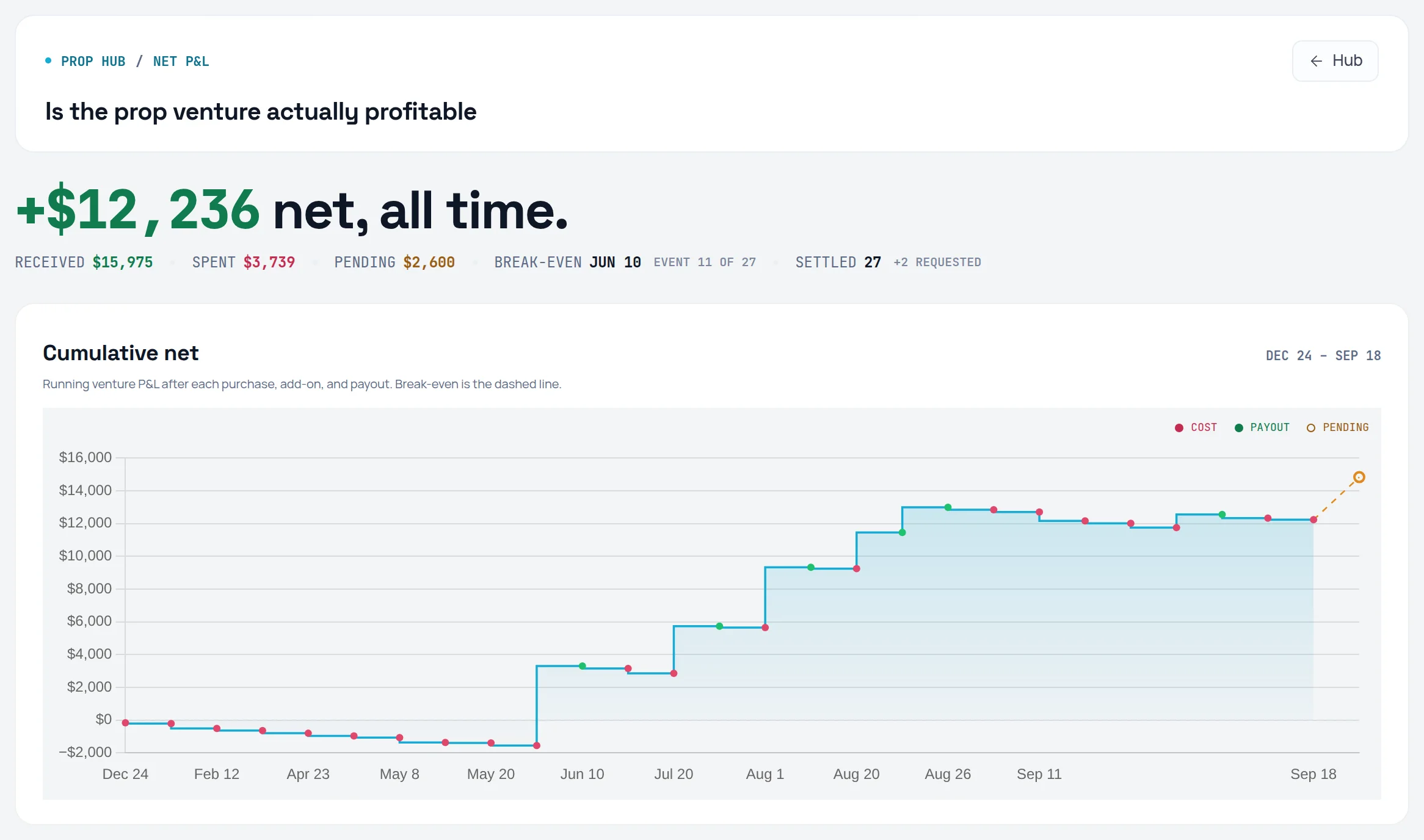
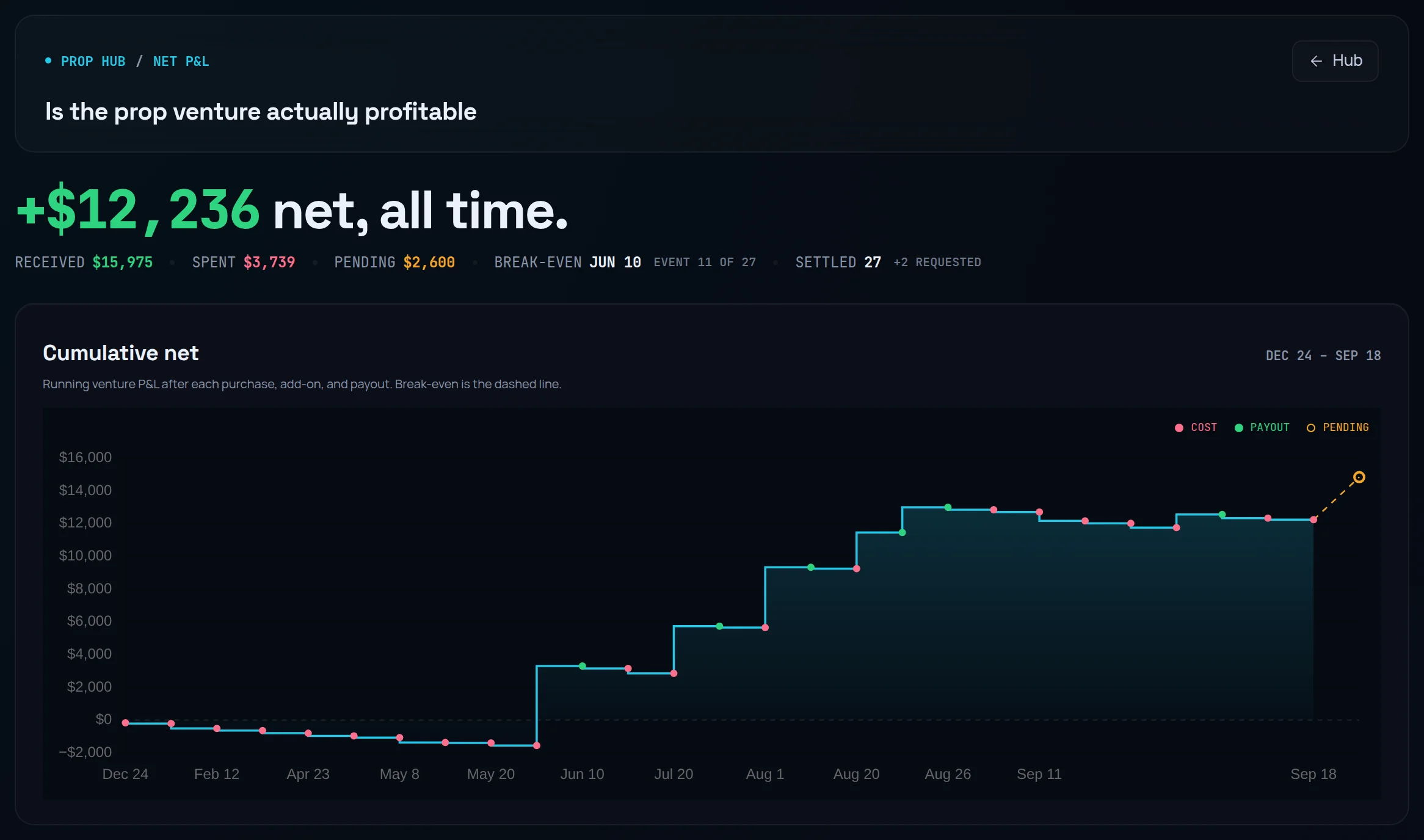
/prop/net): headed "Is the prop venture actually profitable". It shows your net all time, then Received, Spent, Pending, Break-even and Settled. Below that are the Cumulative net curve, a By account breakdown and the full Ledger. - Adding an account: the wizard's purchase step notes that the purchase price feeds Net Prop P&L and ROI from day one. See adding an account.
Frequently asked questions#
Why is my net prop P&L negative when my funded account is in profit?#
Because a profitable balance is not money you have received. Net prop P&L counts only payouts marked Paid, minus what you spent on challenges, resets and fees. Until a firm pays you, the profit on a funded account belongs to the firm. It shows up in your account balance and your progress to target. Your net moves the day you log the payout as Paid.
Do requested payouts count toward net prop P&L?#
No. A payout with status Requested is a claim, not cash. Limbix lists it in the ledger and shows the total as Pending beside your net, but never adds it in. When the money arrives, change the status to Paid and enter the actual amount. A Rejected payout is dropped from the ledger and the total, since that money is not coming.
Does net prop P&L use my profit split?#
Yes. When you log a payout you enter the gross amount, and Limbix works out your share from the account's Profit split %. The form shows it as You receive, and that is the amount that counts. A €1,800 gross payout at a 90% split adds €1,620. If the split is wrong, fix it on the account first, so every payout after it is right.
Are failed and archived challenges included?#
Yes. Every prop account you have added counts, including failed, breached, paid-out and archived ones. Leaving failed challenges out would hide exactly the costs that decide whether prop trading pays. If you archive an account to tidy the board, its purchase price, costs and paid payouts all stay in your net prop P&L. Archiving changes what the board shows, not what you spent.
How do I know if prop trading is worth it for me?#
Look at your own net prop P&L over a long stretch, not one payout. If it stays below zero across many challenges, your payouts are not covering your fees yet. Pass rate tells you how often you finish, and ROI per firm tells you where the money went. Limbix shows your record. It does not tell you what to buy next.