
04 · Metrics
Profit Factor
Profit factor is gross profit ÷ gross loss. Above 1.0 you make money. How Limbix computes it after fees, when it shows ∞, and what a good profit factor is.
Profit factor is gross profit divided by gross loss: the total of all your winning trades over the total of all your losing trades. Above 1.0 you made money. Below 1.0 you lost it. Limbix computes it on net P&L by default, so commissions count against your edge instead of hiding inside your winners.
How it's calculated#
- Gross profit
- Sum of the P&L of every winning trade
- Gross loss
- Sum of the P&L of every losing trade, as a positive number
src/lib/analytics-compute.tsA winning trade is one with P&L above zero, a losing trade one below zero. A scratch at exactly €0 adds to neither side.
Try it#
The calculator opens with the worked example: gross profit €1,600 and gross loss €1,000.
Worked example#
Your week holds ten trades after fees:
| Trades | Total | |
|---|---|---|
| Winners | +€300, +€500, +€600, +€200 | €1,600 |
| Losers | −€150, −€200, −€250, −€100, −€300 | €1,000 |
| Scratch | €0 | €0 |
Profit factor = €1,600 ÷ €1,000 = 1.60
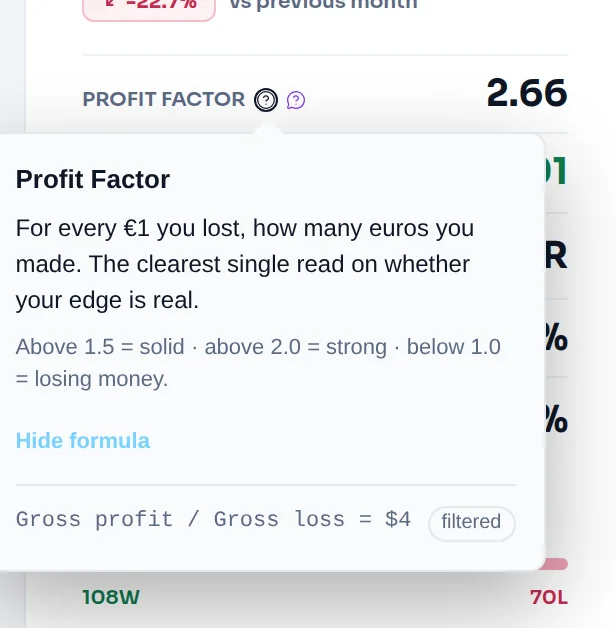
View formula in the tooltip reads: "Gross profit / Gross loss = €1,600 / €1,000 = 1.60".
The same number comes out of win rate and payoff. You won 40% of trades at an average of €400 and lost 50% at an average of €200. Profit factor = (0.40 × €400) ÷ (0.50 × €200) = €160 ÷ €100 = 1.60.
When it shows "—"#
| Situation | What you see |
|---|---|
| No trades in the selected range | "—" on the Dashboard, "N/A" in Reports |
| Only scratch trades (no winners, no losers) | "N/A" in Reports |
| Winners but no losing trade | ∞ on the Dashboard, Trade Log, Analytics and Reports. The tooltip's formula line reads "Not enough data yet — keep logging." A playbook's own page shows "—" instead. |
| Trade Log filter spans more than one currency | No value: a ratio of two money sums means nothing across currencies |
What is a good profit factor?#
The in-app tooltip gives this guide: "Above 1.5 = solid · above 2.0 = strong · below 1.0 = losing money." Reports paints any profit factor below 1.0 amber.
Treat those lines as a guide, not a grade. Three things change what a number means:
- Sample size. A profit factor from 12 trades moves a lot with the next one. Analytics and Reports flag thin slices with a low-sample warning.
- Basis. On Gross, commissions vanish and the number rises. Judge your edge on Net.
- Style. A high win rate with small winners and a low win rate with large ones can reach the same profit factor. Read it next to win rate and Avg Win / Avg Loss.
Profit factor and trade expectancy always agree on direction. Above 1.0, expectancy is positive. Expectancy tells you how much each trade is worth in euros; profit factor tells you how many euros you win for each one you lose.
How to improve it#
Profit factor rises when losers shrink or winners grow. Both are execution:
- Keep losses at the size you planned. A loser that runs past its stop inflates gross loss. Loss Containment shows how often that happens.
- Remove your most expensive mistake. Analytics ranks mistakes by the money they cost. See mistakes by cost.
- Stop when your day is done. Trades taken after your daily loss limit add to gross loss. Set the limit in your risk limits.
- Check your fee drag. If Gross is far above Net, your costs eat your winners. See net or gross.
Where you'll see it#
- Dashboard: Profit factor in the rail, with View formula in its tooltip. See read the day.
- Trade Log: Profit factor in the stats bar, for whatever your filters select.
- Analytics: PF in the summary strip.
- Reports: Profit factor in the Overview ledger, the KPI cards, each breakdown table and Compare. See breakdowns.
- Playbooks: PROFIT FACTOR on each playbook's page, so you can compare setups. See compare playbooks.
Frequently asked questions#
What is a good profit factor?#
Limbix's tooltip reads above 1.5 as solid and above 2.0 as strong; below 1.0 you are losing money. Those are guides. A profit factor needs enough trades behind it to mean anything, and it should be measured after fees. A steady 1.4 over several hundred trades says more about your edge than a 3.0 over fifteen.
Profit factor vs win rate: which matters more?#
Profit factor, because it already contains win rate. It weighs how often you win against how much you win and lose. A 70% win rate with a profit factor of 0.8 loses money. A 35% win rate with a profit factor of 1.8 makes it. Use win rate to understand how you reach your profit factor, not as the verdict.
Why does my profit factor show ∞?#
Because the range holds winning trades and no losing ones. Profit factor divides by gross loss, and gross loss is zero, so the ratio is infinite. Limbix shows ∞ rather than invent a number. Widen the date range or remove filters and the figure becomes finite once a losing trade is included.
Can profit factor be negative?#
No. Gross profit and gross loss are both positive totals, so the ratio is zero or above. A profit factor of 0 means you had losing trades and no winners. Your net P&L can be negative, and that shows as a profit factor below 1.0, not below zero.
How is profit factor different from expectancy?#
Profit factor is a ratio: euros won per euro lost. Trade expectancy is an amount: the average euros each trade made. They move together, since a profit factor above 1.0 always means a positive expectancy. Expectancy tells you what one more trade is worth. Profit factor tells you how efficient your wins are against your losses.