
04 · Metrics
R-Multiple Distribution
An R-multiple distribution counts your trades in bands of R, where 1R is what you risked. The buckets Limbix uses, how to read the shape, and what to fix.
An R-multiple distribution counts how many of your trades ended in each band of R, where 1R is what you risked. It shows the shape of your results: whether losses stop near −1R and whether winners run past +1R. Limbix uses one set of buckets on every screen, so a trade lands in the same band everywhere.
How it's calculated#
- Net P&L
- The trade's P&L after fees. R always uses net
- Risk amount
- Distance from entry to stop × point value × quantity
src/lib/metrics.tsEach trade's realized R goes into exactly one bucket:
| Bucket | Holds trades where R is |
|---|---|
| <= -2R | −2.0 or lower |
| -2R to -1R | below −1.0 and above −2.0 |
| -1R to 0R | from −1.0 up to (not including) 0 |
| 0R | exactly 0 |
| 0R to 1R | above 0 and below 1.0 |
| 1R to 2R | from 1.0 up to (not including) 2.0 |
| >= 2R | 2.0 or higher |
| No R | the trade has no risk amount |
A trade at exactly −1.0R sits in -1R to 0R: a loss that stopped at your stop counts as contained. A trade at exactly +2.0R sits in >= 2R.
Worked example#
Ten trades, each with its realized R:
| Trade | Net P&L | Risk amount | R | Bucket |
|---|---|---|---|---|
| 1 | +€300 | €200 | +1.5R | 1R to 2R |
| 2 | −€150 | €150 | −1.0R | -1R to 0R |
| 3 | +€500 | €250 | +2.0R | >= 2R |
| 4 | −€200 | €200 | −1.0R | -1R to 0R |
| 5 | −€250 | €250 | −1.0R | -1R to 0R |
| 6 | €0 | €200 | 0.0R | 0R |
| 7 | +€600 | €200 | +3.0R | >= 2R |
| 8 | −€100 | €200 | −0.5R | -1R to 0R |
| 9 | −€300 | €250 | −1.2R | -2R to -1R |
| 10 | +€200 | no stop | none | No R |
In Reports (eight buckets): <= -2R 0 · -2R to -1R 1 · -1R to 0R 4 · 0R 1 · 0R to 1R 0 · 1R to 2R 1 · >= 2R 2 · No R 1.
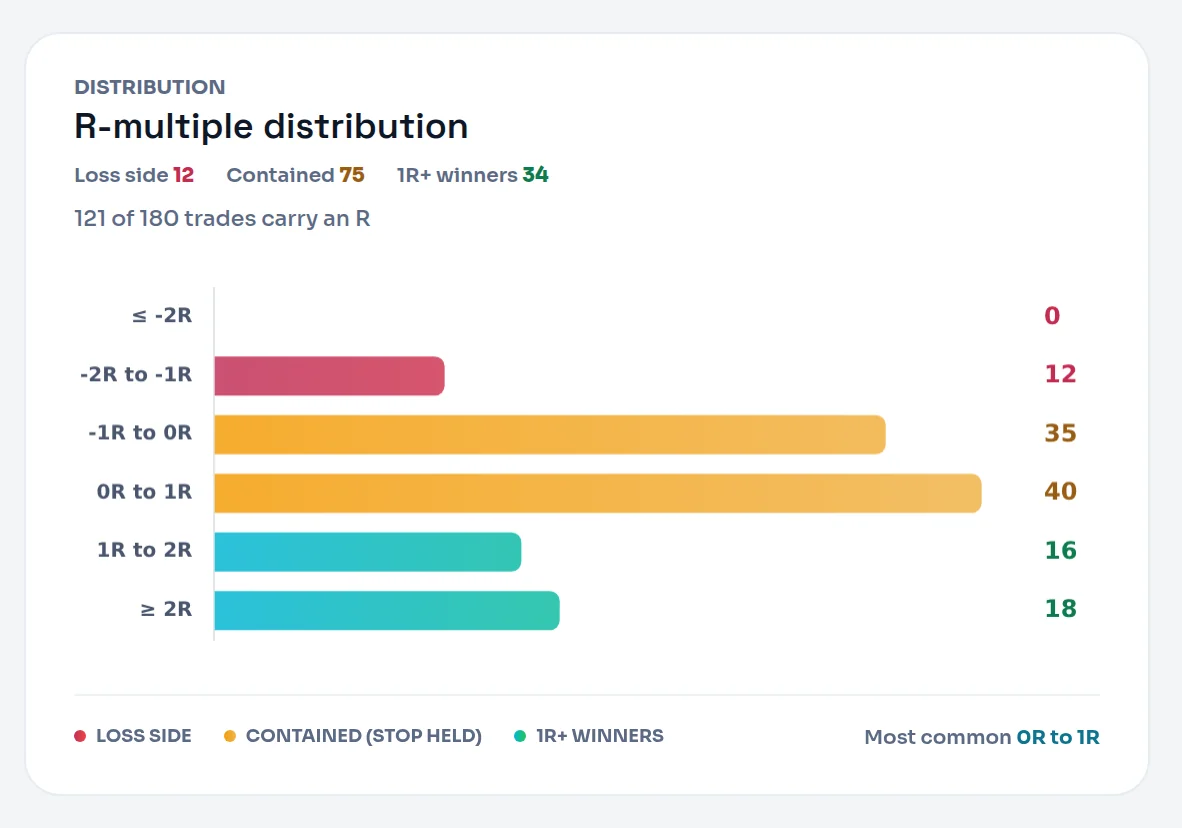
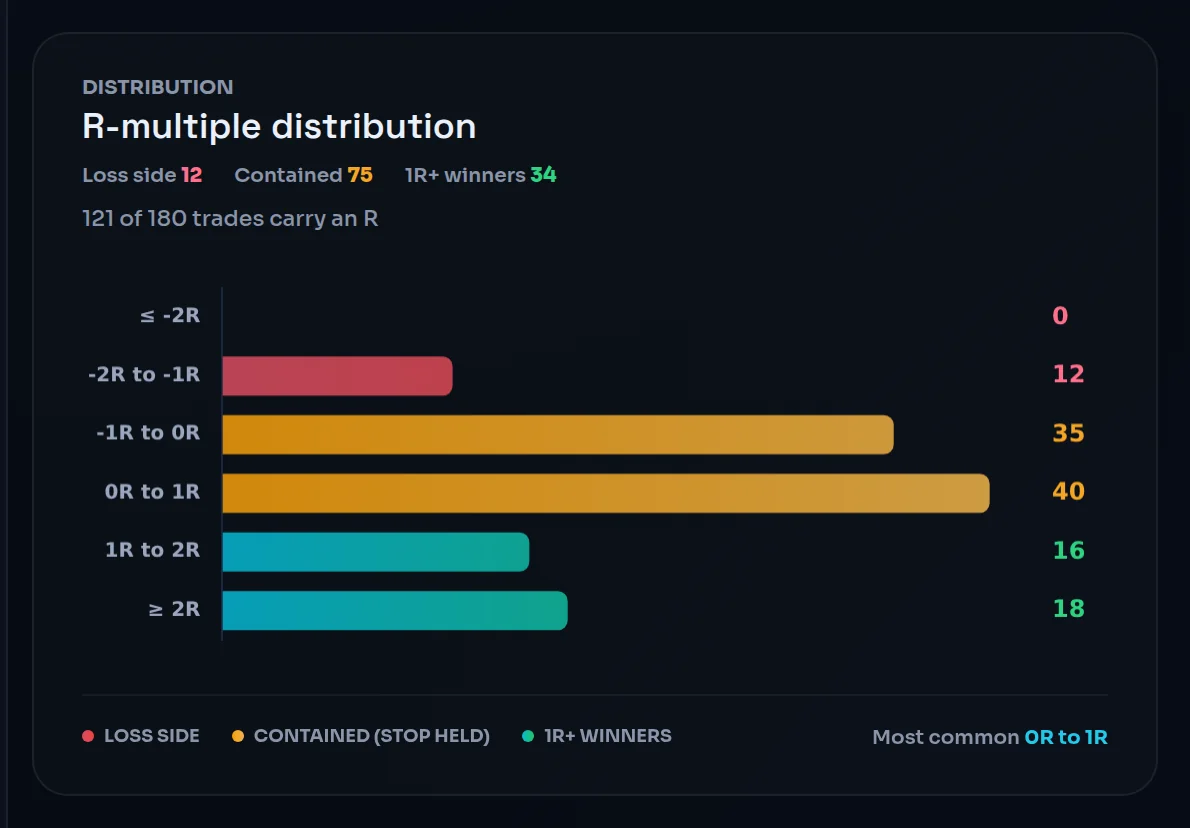
On the Dashboard (six bars): ≤ -2R 0 · -2R to -1R 1 · -1R to 0R 4 · 0R to 1R 1 · 1R to 2R 1 · ≥ 2R 2. Above them: Loss side 1 · Contained 5 · 1R+ winners 3, and "9 of 10 trades carry an R".
Read the shape. Your losses cluster at −1R, which means your stops held. One loser, trade 9, ran to −1.2R. Three winners reached 1R or more, two of them 2R or more. That is the shape the tooltip describes as healthy.
When it shows "—"#
| Situation | What you see |
|---|---|
| No trade in the range carries an R | Empty bars on the Dashboard; Reports shows only the No R bucket |
| Some trades carry no R | "N of M trades carry an R" on the Dashboard card |
| Every trade carries an R | "N trades scored" |
A winner with no stop has no R. A loser with no stop does: Limbix uses its exit as the stop, which puts it at about −1R. See R-multiple.
What is a good R-multiple distribution?#
The tooltip's guide: "Cluster around -1R for losses, spread above +1R for wins." In words: small, uniform losses and winners that run.
What the shape usually means:
| You see | It usually reflects |
|---|---|
| Losses bunched in -1R to 0R | Stops honoured |
| Trades in -2R to -1R or <= -2R | Losses that ran past the stop, gaps, or fees just past −1R |
| Winners bunched in 0R to 1R | Winners closed before their target |
| A few trades at >= 2R | Winners allowed to run |
| A tall No R bar | Stops not recorded, so the chart describes fewer trades |
One thing to know about fees. R uses net P&L, so a stop that filled exactly where you placed it lands a touch past −1R once commission is taken: −1.02R, say. That trade goes in -2R to -1R, the Dashboard's Loss side. Loss Containment allows for this with a small margin past −1R for slippage and fees, but the buckets don't. Look at the individual R values before you conclude a stop didn't hold.
How to improve it#
- Record a stop on every trade. It shrinks the No R count and makes the chart describe your whole book. See add a stop and target.
- Exit at the stop, not past it. Trades below −1R are losses you let run. Loss Containment scores this.
- Let winners reach their target. A pile in 0R to 1R often means early exits, which the mistake detectors flag.
- Plan for at least your minimum R:R. Set it in each playbook, and skip setups whose target can't pay it. See risk parameters.
Where you'll see it#
- Dashboard: the R-multiple distribution card, with the Loss side, Contained and 1R+ winners counts above six bars. See read the day.
- Reports › Breakdowns › Risk: the R-multiple distribution chart, all eight buckets in fixed order with No R kept apart, and a table view. See breakdowns.
Frequently asked questions#
What is an R-multiple distribution?#
It is a count of your trades by result, measured in units of risk. Each trade's P&L is divided by the amount you risked, and the result goes into a band such as −1R to 0R or 1R to 2R. The chart shows whether your losses stay small and uniform and whether your winners run, which a single average can't show.
Why is my stopped-out trade in the −2R to −1R bucket?#
Because fees push it just past −1R. R uses net P&L, so a stop that filled exactly where you placed it loses your planned risk plus commission, for example −1.02R. Anything below −1.0R belongs in −2R to −1R. Check the trade's R in the Trade Log: a value a hair past −1R is fees, not a moved stop.
Where do trades without a stop go?#
It depends on the result. A losing trade with no stop gets an R from its exit price, so it usually lands near −1R. A winning trade with no stop has no risk amount, so it goes in No R. Reports shows No R as its own bucket; the Dashboard leaves it out of the bars and prints "N of M trades carry an R".
Why does the Dashboard show six bars and Reports eight?#
They use the same bucket rule and group it differently. The Dashboard merges the 0R bucket into 0R to 1R and reports No R as a count above the chart rather than a bar. Reports keeps all eight buckets, with 0R and No R separate. A trade never changes bucket between the two screens.